
MudPro
Precision Mud Reporting for Smarter Drilling fluid Management

Download MUDPRO
MUDPRO Supports Mud Engineers on the Rig
- Save time, reduce errors, and improve wellsite decision-making
- Quickly track mud inventory and volume to prevent fluid shortages or overflows
- Model complex fluid behaviors for better prediction of downhole conditions
- Generate daily, customizable reports that keep your team and stakeholders informed
- Monitor multiple wells and compare mud properties to improve consistency and performance
- Optimize the use of additives, reducing operational costs without sacrificing performance
Explore how MUDPRO can optimize your mud operations and improve wellsite efficiency.
Rotary drilling runs on one indispensable resource: drilling fluid, better known as mud. Because mud properties directly affect drilling success, mud engineers must carefully monitor and manage mud behavior.
Avoid costly problems like stuck pipe and wellbore instability with MUDPRO’s advanced drilling fluid and management software designed to simplify and optimize mud reporting and management.
Get to Know MUDPRO
Comprehensive drilling fluid software:
- Multi-type rheology modeling for precise fluid behavior prediction
- Advanced hydraulics calculations optimize mud properties and maintain wellbore stability
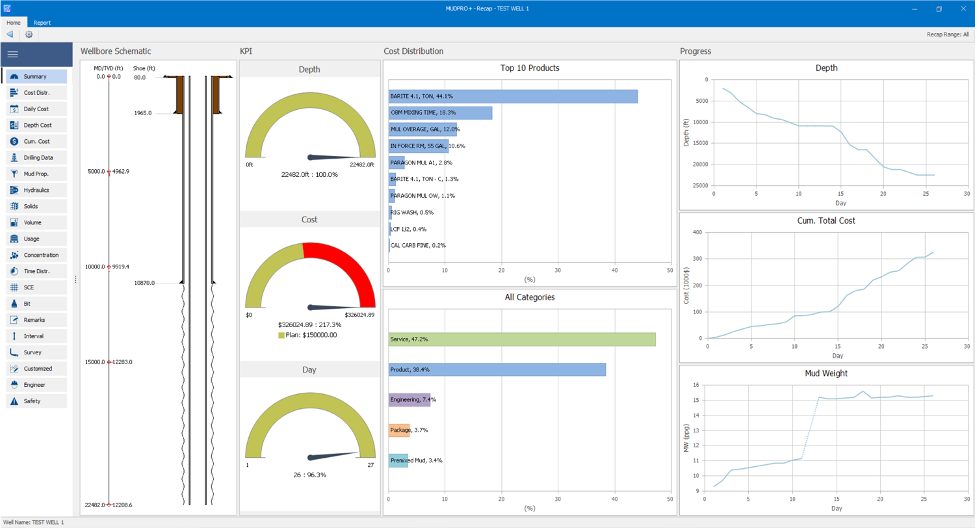
- Detailed mud volume tracking and inventory management, including pit snapshots and concentration calculations
AI data analysis:
- Enhanced data structure
- AI-driven insights help mud engineers optimize fluid properties and additive usage
Smart reporting and data management:
- Generate customized daily mud reports
- Export reports compatible with other LINQX software for seamless integration into drilling operations
- Backup data automatically to safeguard critical information
Operational flexibility:
- Support for pad drilling operations and riser drilling lines, including choke, kill, and boost lines
- Compatible with land and offshore wells
- Master product database tracks additives, salts (NaCl, CaCl₂), and more for precise fluid formulation
Why Choose MUDPRO for Drilling Fluid Management?
MUDPRO combines robust mud hydraulics calculations with advanced data analysis, allowing engineers to:
- Track mud volume and additives usage
- Model multiple mud rheology types for various drilling scenarios
- Analyze different mud formulations for performance optimization
- Automate daily mud report generation with customizable formats and real-time data
- Integrate with other tools like HYDPRO for seamless modeling across functions
Frequently Asked Questions
What types of drilling fluids does MUDPRO support?
MUDPRO supports water-based, oil-based, and synthetic mud, with advanced rheology modeling options like Bingham Plastic and Herschel-Bulkley.
Can MUDPRO automate daily mud reporting?
Yes, MUDPRO auto-generates customizable daily mud reports to save you time and reduce rig site reporting errors that can occur from manual entries.
How does MUDPRO help with volume tracking?
MUDPRO provides precise mud volume tracking with pit snapshots and real-time reporting. This ensures accurate fluid management, gives early warnings for low inventory, and helps prevent downtime so your well stays productive.
What are the system requirements?
Our industrial analytics software options require:
- Operating Systems: Microsoft Windows® 10 or above
- Microsoft Office®: 2016 or above
- Processor: Dual-core processor, 1.4 GHz or higher
- Memory: 8 GB RAM
- Disk Space: 600 MB of free disk space for installation
- Display: 1,280 x 768 display resolution
*Note: The software may still run on Windows 10, Office 2016, or Office 2019; however, these versions have reached end-of-support from Microsoft and are not officially supported.
You May Also be Interested in…